JSON Editor & Validator
Load External Data
Browse local files
Select a .json file from your computer
JSON Editor Online Tool
You can also try our JSON Formatter, JSON Validator tools for better JSON handling.
Edit JSON Data Easily
JSON Editor Online helps to Edit, View, Analyse JSON data along with formatting JSON data. It's very simple and easy way to Edit JSON Data and Share with others. It's also a JSON File Editor. Upload JSON File and Start Editing.
It uses the browser's javascript library to create a JSON tree and edit JSON data. It does not send any JSON data to the server for processing. So it's fast to get results.
Upload and Edit JSON File
Best and Secure Online JSON Editor works well in Windows, Mac, Linux, Chrome, Firefox, Safari and Edge.
This JSON Editor supports edit JSON File. Click on the Load Data button, it will open the dialog box, click on Upload File, which will open the file explorer of the operating system. Select the JSON file and click open/select.
How to Load JSON Data
Using the JSON Editor Online tool is simple and user-friendly. To import your JSON data, click on the Load Data button. This will open a popup window where you can choose how to load your data.
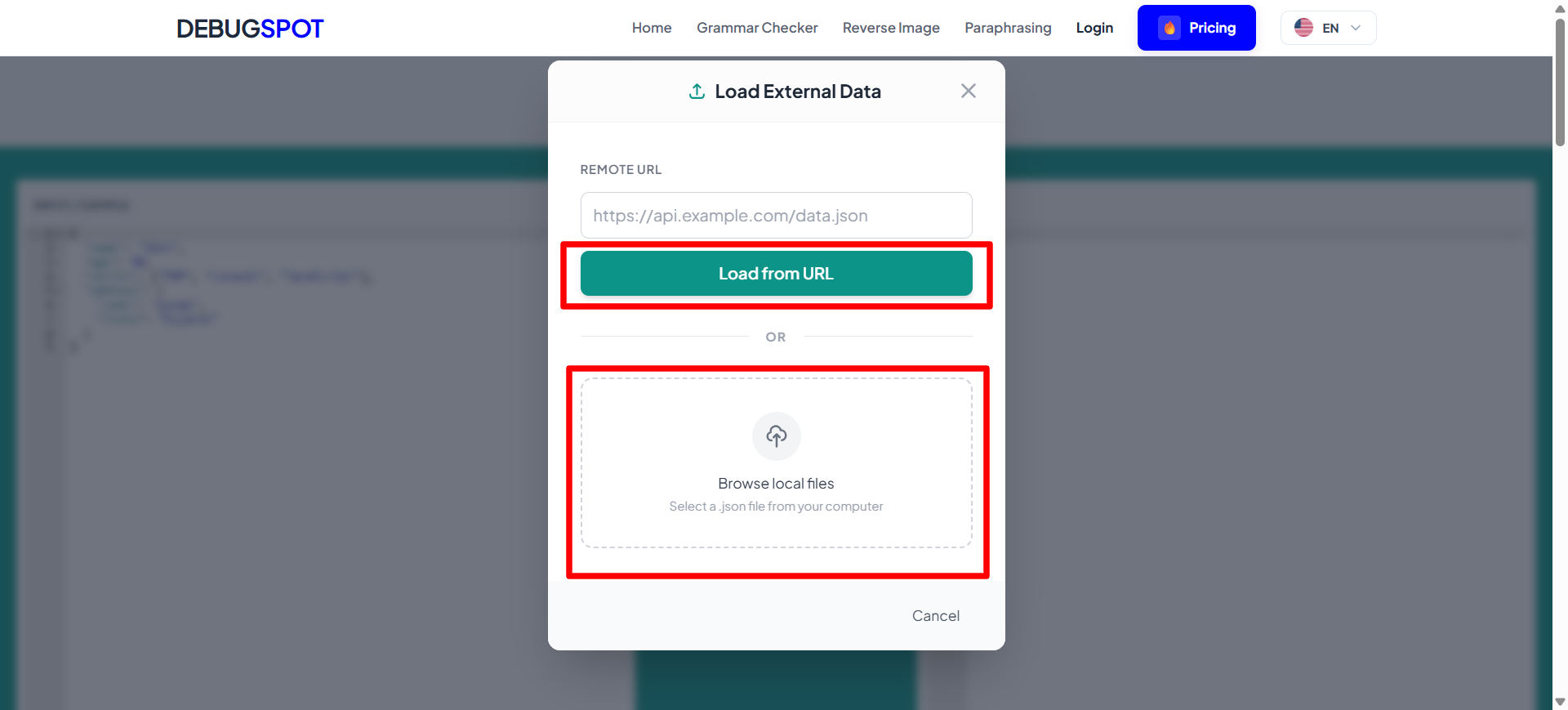
In the popup, you will see two options:
- Load from URL: Enter a valid API or JSON file URL and click "Load from URL" to fetch and display the data instantly.
-
Upload File: Click on the upload area to browse your computer and select a
.jsonfile. The file will be loaded directly into the editor.
Once the data is loaded, it will automatically appear in the editor where you can edit, format, and analyze it in real-time.
This process works completely in your browser, ensuring fast performance and full data privacy.
Example
Before Editing:
{"name":"John","age":30,"skills":["PHP","Laravel","JavaScript"]}
After Editing (Formatted JSON):
{
    "name": "John",
    "age": 30,
    "skills": [
        "PHP",
        "Laravel",
        "JavaScript"
    ]
}
This example shows how you can easily edit and format JSON data using this tool.
How do I edit JSON online for free?
Paste your JSON into DebugSpot's free online JSON editor, edit values directly with live validation that highlights syntax errors as you type, then click to format and beautify the result. When you are done, copy or download the clean JSON. It is 100% free with no signup, and it runs entirely in your browser — your JSON is never uploaded, so it stays completely private on your own device.
What is a JSON Editor?
A JSON Editor is a free online tool for writing, editing, and fixing JSON data with the help of syntax highlighting, formatting, and live error checking. Editing JSON in a plain text box is risky — one missing comma or bracket makes the whole file invalid. A proper JSON editor highlights the structure, points out mistakes as you type, and lets you reformat instantly, so you can make changes with confidence.
DebugSpot's JSON Editor works entirely in your browser. Your JSON is edited on your own device and never uploaded, so it is safe to work with sensitive configuration files, API payloads, or database records. You can paste existing JSON, tweak values, add or remove fields, beautify or minify the result, and copy it back out — all in one place.
Whether you are updating a config file, building a test payload, or correcting a broken JSON document, an editor makes the process fast and error-free. It is completely free, needs no signup, and runs on any device and browser.
⚡ Quick Answer:
- Open debugspot.com/json-editor
- Paste or type your JSON into the editor
- Edit values, add or remove fields, and format it
- Copy the corrected, valid JSON out
100% free · No signup · Works in your browser · No watermark
DebugSpot JSON Editor vs Other Online Editors
| Feature | DebugSpot | Typical Online Editors |
|---|---|---|
| Price | Free | Free / freemium |
| Privacy | Edited in your browser | Often uploaded to a server |
| Signup | None | Sometimes required |
| Live validation | Yes, as you type | Limited or on-submit |
| Format & beautify | One click | Varies |
| Ads & clutter | Minimal | Often heavy |
Many free online JSON editors send your data to a server to process it, which can be a concern for sensitive config files or API payloads.
Step-by-Step Guide
Everything you need to know — in under a minute.
Load your JSON
Paste existing JSON into the editor, or start typing a new document from scratch.
Edit with confidence
Change values, add or remove keys, and restructure the data. Syntax highlighting and validation help you avoid mistakes.
Format or fix errors
Beautify the JSON for readability or minify it for transport. If there is a syntax error, the editor shows you where.
Copy the result
Once your JSON is valid and looks right, copy it back into your project, config, or API request.
How Does It Work?
✍️ In-browser editing
You edit JSON directly in a rich editor with syntax highlighting, all running locally in your browser.
✅ Live validation
As you edit, the tool checks whether the JSON is valid and reports errors with their location.
🎨 Format & minify
One click beautifies the JSON with indentation, or minifies it into a compact single line.
🔒 Nothing uploaded
Your JSON stays entirely on your device — safe for confidential data.
Key Features & Advantages
Rich editing
Edit JSON with syntax highlighting so structure and mistakes are easy to see.
Live error checking
Catches invalid JSON as you type and shows where the problem is.
Format & minify
Beautify for readability or minify for transport in one click.
100% private
Your JSON never leaves your browser.
Free with no signup
Completely free with no account or watermark.
Works everywhere
Runs in any browser on desktop and mobile.
Who Uses This Tool?
👨💻 Developers
Quickly edit config files, fixtures, and API payloads with instant validation.
🧪 QA & testers
Build and tweak JSON test data without breaking the syntax.
🔌 API integrators
Adjust request bodies and mock responses while wiring up an integration.
🛠️ DevOps engineers
Edit JSON configuration for services and pipelines safely.
📝 Technical writers
Craft correct JSON examples for documentation.
🎓 Students
Practise writing JSON and learn from the live error feedback.
Common Use Cases
⚙️ Editing config files
Update values in a JSON configuration and verify it stays valid.
🧪 Building test payloads
Create and modify JSON request bodies for API testing.
🩹 Fixing broken JSON
Repair a malformed JSON document using the error hints.
🎭 Creating mock data
Write realistic JSON fixtures for development and demos.
🔁 Reformatting data
Beautify or minify JSON depending on whether it is for humans or machines.
📄 Preparing API requests
Assemble a correct JSON body before sending it to an endpoint.
Tips & Best Practices
✅ Validate before saving
Make sure the editor shows no errors before using the JSON — invalid JSON breaks apps and APIs.
✅ Use double quotes everywhere
JSON requires double quotes for keys and string values; single quotes cause errors.
✅ No trailing commas
Remove any comma after the last item in an object or array.
✅ Minify for production
Keep an indented copy for editing and minify the version you ship.
✅ Back up before big edits
Copy the original JSON somewhere safe before making large changes.
✅ Safe for sensitive data
Because it is fully local, editing confidential JSON here is private.
Full List of Benefits
More Free Developer Tools

Related JSON Editor Tools
Frequently Asked Questions (FAQ)
Why JSON FORMATTER?
JSON Formatter helps you convert messy or compressed JSON into a clean and readable format. It makes debugging, understanding, and working with JSON data much easier.
Why format JSON Online?
Formatting JSON online saves time and removes the need to install any software. You can quickly paste your JSON, format it, and validate it directly in your browser.
How do I format a JSON file?
You can paste your JSON into the input editor or upload a JSON file, then click on the Format JSON button to get a properly structured output.
Is login required to save JSON data?
No, login is not required. The tool can store your last JSON data locally in your browser using local storage.
Have you accidentally saved your JSON data?
Your data is stored only in your browser and not on any server. You can clear it anytime using the clear button or by clearing your browser storage.