
Need to complete a PDF form but hate creating accounts? You can fill PDF form online free no login required, right in your browser. This 2026 guide shows how to fill PDF form online free no login walls, no watermarks, and no software – then download your completed form instantly.
Why Fill PDF Forms Online With No Login?
Most form-filling websites make you sign up, verify an email, or hit a paywall before you can download your file. That is a lot of friction for a task that should take a minute. A no-login tool removes every one of those steps, so you can start typing the moment your form loads. When you fill PDF form online free no login, you get real convenience with none of the hassle.
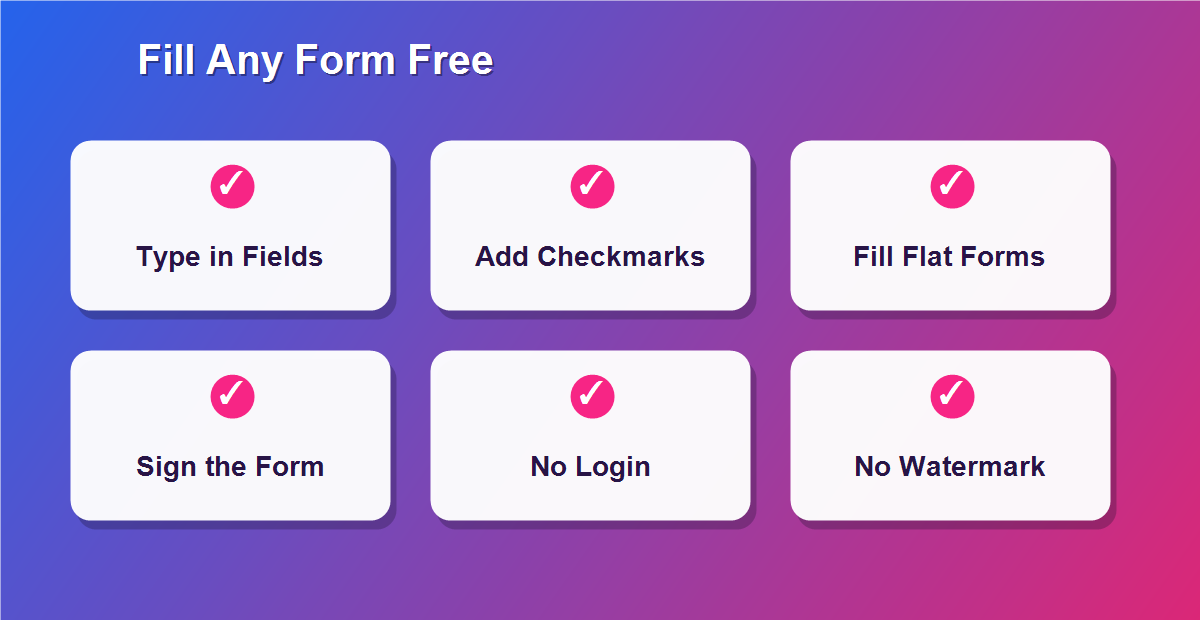
- Zero friction: start immediately, no account needed.
- No watermarks: your finished form stays clean and professional.
- Full privacy: the file is handled in your browser, never uploaded.
- Any device: works on desktop, tablet, or phone.
- Instant download: save the completed PDF in one click.
How to Fill PDF Form Online Free No Login (Step by Step)
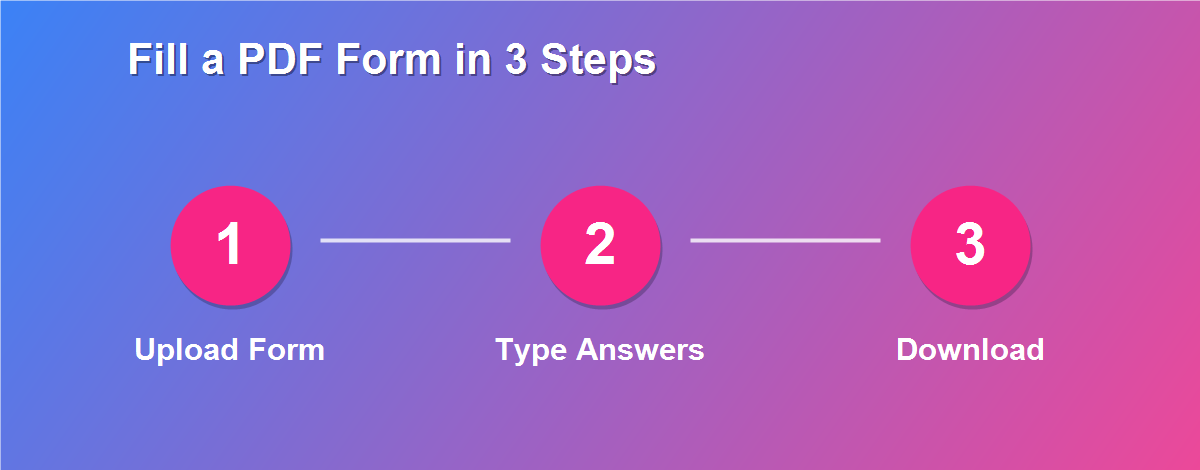
The entire process takes about a minute from start to finish, and there is nothing to install:
- Open the DebugSpot PDF Editor – no account required.
- Upload the PDF form you need to complete.
- Select the Text tool and click any blank field to start typing.
- Add checkmarks, an X, or your signature where needed.
- Double-check every field for accuracy.
- Click Download to save your filled-in form.
The finished form is ready to email or print, with no strings attached and nothing left behind on a server.
What Kinds of Forms Can You Fill?
Almost any PDF form works, whether it was designed to be interactive or simply scanned from paper. In practice, people use this to fill PDF form online free no login for documents like:
- Job applications and onboarding paperwork.
- Tax forms, invoices, and expense sheets.
- Rental, lease, and real-estate agreements.
- Medical, school, and consent forms.
- Government and immigration documents.
Interactive Forms vs Flat (Scanned) Forms
There are two kinds of PDF forms, and this editor handles both without any special setup:
| Form Type | How to Fill It |
|---|---|
| Interactive form (clickable fields) | Click a field and type directly |
| Flat or scanned form (no fields) | Use the text tool to place text anywhere |
Because the editor lets you place text anywhere on the page, it fills both types – even scanned forms that have no clickable fields at all.
Can You Fill and Sign a Form Together?
Yes. Many forms need both typed answers and a signature at the bottom. After you finish typing, switch to the sign tool, add your signature by drawing or typing, and place it on the signature line. You can complete the entire form – text, checkboxes, and signature – in one sitting, then download it as a single finished PDF. There is no need for a separate signing app or a second website, which keeps the whole task quick and private.
Fill PDF Forms on Any Device
Since everything runs in the browser, you can fill PDF form online free no login on whatever device is closest:
- Windows & Mac: click and type in any browser.
- iPhone & iPad: tap a field and use the on-screen keyboard.
- Android: works in Chrome with no app install.
- Chromebook: ideal, since everything already runs in the browser.
Why “No Login” Matters for Your Privacy
Forms often contain sensitive details – your address, ID numbers, salary, or medical information. Sites that require an account usually upload your file to their servers, where it may be stored or scanned. With a no-login, browser-based tool, your form never leaves your device, so there is no account, no cloud copy, and no data trail. That is the safest way to fill PDF form online free no login for anything private, and it is a big reason people choose a local tool over a cloud service.
Fill Forms for Work, School, and Government
The need to complete a PDF form comes up constantly. At work, you might fill in timesheets, expense claims, purchase orders, or a new-hire packet. Students and parents deal with enrollment forms, permission slips, and financial-aid paperwork. And government forms – from tax documents to visa applications – almost always arrive as PDFs that expect neatly typed answers. Being able to fill PDF form online free no login means you can handle all of these in one place, without downloading a different tool for each one.
How to Tell If Your Form Is Interactive or Flat
Not sure which kind of form you have? Try clicking inside a blank field. If a cursor appears and you can type straight into it, the form is interactive. If nothing happens, it is a flat or scanned form – but that is not a problem here. With the text tool you simply click anywhere and type, so a flat form is filled exactly the same way as an interactive one. This is a big advantage over form fillers that only work with interactive fields and leave you stuck on scanned documents.
What Happens to Your Data?
Nothing leaves your device. When you open a form in the editor, it loads directly into your browser and stays there. As you type answers and download the finished file, none of that information is sent to a server, stored in the cloud, or tied to any account – because there is no account to begin with. For anyone completing forms that contain financial, medical, or identity details, that local-only approach is exactly what you want.
How to Fill a PDF Form on Your Phone
Your phone is often the quickest way to finish a form. Open the editor in your mobile browser, upload the PDF from your files, and tap any blank space to bring up the keyboard. Type your answer, tap the next field, and repeat. Pinch to zoom in for small boxes so your text lines up neatly. When you are done, tap download and the completed form saves to your phone, ready to email straight back – no app, no account, and no waiting until you reach a computer.
Filling Long or Multi-Page Forms
Long forms can feel daunting, but they are just as easy. Work through the document page by page, using the thumbnails to jump between sections. Fill every required field on one page before moving to the next so nothing is missed, and use the same font size throughout for a tidy look. Because the tool keeps your whole form in the browser as you work, you can scroll back and forth freely, review your answers, and only download once everything is complete.
Can You Save a Half-Finished Form?
The safest approach is to complete a form in one sitting, since a browser-based tool keeps your work in the current session. If you need a break on a long form, download the partly filled version, then re-upload it later to continue where you left off – your earlier answers are baked into that downloaded file. Keeping the original blank form as well means you always have a clean copy to fall back on if you want to start again.
Do You Need to Print the Form?
No. Once you fill the form and download it, you have a complete digital document you can email, upload to a portal, or store for your records. Printing is only necessary if a specific office asks for a physical copy, and even then you are printing a neatly typed form rather than one filled in by hand. Keeping everything digital is faster, cleaner, and far easier to file and find later.
Why Typed Answers Look More Professional
A form filled with clear, typed answers simply looks better than one scribbled by hand. Typed text is easy to read, never smudges, and lines up neatly inside each field, which reduces the chance that someone misreads your information. For job applications, contracts, and official paperwork, that polish matters – it signals care and makes your submission stand out for the right reasons.
Filling Forms Without Errors
Accuracy is everything on a form. Before you download, read back through every field, check that dates and numbers are correct, and make sure no required box is left blank. Zoom in to confirm your text sits inside the lines rather than overlapping labels. A one-minute review at the end catches most mistakes and saves you from having to resubmit, which is especially important for tax, legal, and application forms where errors cause real delays.
Common Mistakes to Avoid
- Text that overflows the field – reduce the font size so it fits neatly.
- Misaligned answers – zoom in to line text up with each label.
- Forgetting to sign or date – many forms are invalid without both.
- Skipping a required box – scan the whole form before downloading.
- Saving over your only copy – keep a blank version in case you need to redo it.
Tips for Filling PDF Forms Cleanly
- Match the font size to the form for a tidy, printed look.
- Zoom in to line text up precisely with each field.
- Use checkmarks or an X for yes/no and tick boxes.
- Review before downloading so nothing is missed.
Related Free PDF Guides
Filling forms is just one thing you can do with a PDF. These free step-by-step guides pair perfectly with this one:
- Add a signature to a PDF online free – sign the form you just filled.
- Edit a PDF without Adobe Acrobat free – the full editing toolkit.
- Password protect a PDF online free – secure a completed form.
- Edit a scanned PDF free – fill scanned paper forms.
- Remove pages from a PDF free – trim extra pages from a form pack.
Frequently Asked Questions
Can I fill PDF form online free no login?
Yes. The editor lets you complete and download any PDF form without creating an account or paying anything. There is no trial and no hidden step before download.
Will there be a watermark?
No. Your finished form downloads clean, with no watermark or branding added.
Are my details safe?
Yes. The form is processed entirely in your browser, so your personal information is never uploaded.
Can I fill a scanned form with no fields?
Yes. Use the text tool to place typed text anywhere on the page, even on flat scans.
Can I fill forms on my phone?
Absolutely. The tool is touch-friendly and works in any mobile browser.
Do I need to convert the form first?
No. You fill the PDF directly, which keeps the original layout intact and avoids formatting problems.
Can I sign the form as well?
Yes. Add a signature with the sign tool after filling the fields, then download it all as one PDF.
Is there a limit on how many forms I can fill?
No. You can fill as many forms as you need, as often as you like, at no cost.
Will the filled form open on any device?
Yes. You download a standard PDF that opens in every reader on every device.
Can I fix a mistake after typing?
Yes. Just click the text again to edit it, or delete it and retype before you download.
Fill Forms Without Downloading Software
One of the biggest advantages of a browser-based tool is that there is nothing to install. Desktop form-filling programs take up space, need updates, and often cost money, while browser extensions can raise privacy concerns. With an online editor you simply open a web page and start typing. That means you can fill PDF form online free no login on a work computer, a library machine, or a friend borrowed laptop without installing a thing, and there is no leftover software to remove afterwards.
How Businesses Use PDF Form Filling
Companies of every size rely on PDF forms daily. HR teams process new-hire paperwork, finance departments handle expense and purchase forms, and sales teams complete order sheets and agreements. Doing this digitally keeps records neat, searchable, and easy to store, and it removes the delay of printing and scanning. For small businesses especially, a free form filler delivers the same capability that larger firms pay for, letting them look professional without adding a software bill.
Filling the Same Form Repeatedly
If you complete the same form again and again – a weekly timesheet or a standard order form, for example – you can speed things up by keeping a partially filled master copy. Fill in the details that never change, download that version, and reuse it as your starting point each time, only updating the fields that differ. This small trick turns a repetitive chore into a thirty-second task and keeps your entries consistent from one submission to the next.
What to Do If a Field Will Not Type
Occasionally a field seems to resist typing. Almost always this means the form is flat or scanned, so there is no interactive field to click into. The fix is simple: switch to the text tool and click directly on the blank space to place your text there instead. Because the editor lets you type anywhere on the page, a stubborn or scanned form is filled just as easily as an interactive one – you are never stuck.
Fill Forms Safely on Shared Computers
Sometimes you have to complete a form on a shared or public computer. Because a browser-based tool keeps your file in the current session and never uploads it, your information is not saved to any account. To stay safe, download your finished form to a personal drive or email it to yourself, then close the browser tab so nothing is left behind. This local-only handling is exactly why a no-login tool is well suited to shared machines.
Why Free Beats Paid for Form Filling
For the everyday job of completing a PDF form, a paid subscription rarely makes sense. The core task – typing answers, ticking boxes, and signing – is fully covered by a free browser tool, with no watermark and no limit. Paid apps add features most people never touch, like advanced form creation or batch processing. Unless you build complex forms for a living, a free filler does everything you need and keeps your money in your pocket.
Fill Forms Anytime, From Anywhere
Because the tool lives in your browser, there are no office hours and no waiting. Whether you need to complete a form late at night, during a commute, or on a weekend, it is ready the moment you open the page. That round-the-clock availability, combined with instant downloads and no account to create, is what makes filling PDF forms online so convenient for busy people who just want the job done.
Fill Your PDF Form Free — No Login
Stop signing up just to complete one document. Use the free online PDF Editor to fill PDF form online free no login, and browse more free online tools from DebugSpot.